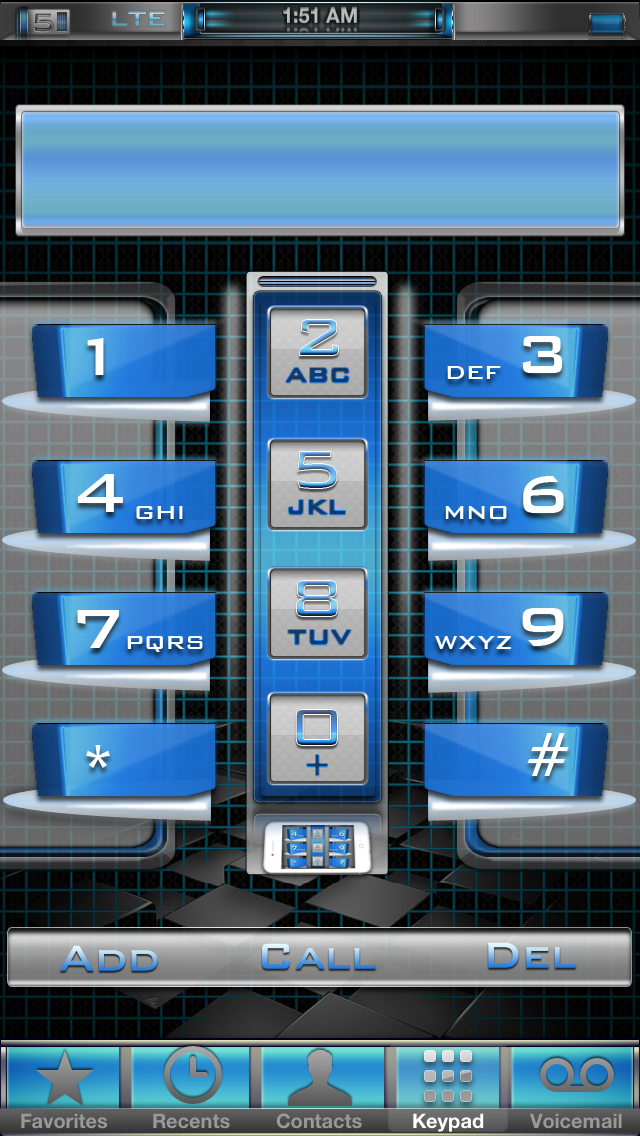
1nspire is inspired by iOS7. A professionally designed iPhone Theme
Showing posts with label iPhoneTheme. Show all posts
1nfect3d i5 Blue
1nfect3d i5 Blue
$2.99 or free with the purchase of 1nfect3d i5
Available in Cydia Soon.
$2.99 or free with the purchase of 1nfect3d i5
Available in Cydia Soon.
This is a full theme, not an Addon!
Color Keyboard Theme is included, and requires Color Keyboard from cydia to work.
Includes Full UI, Auto Create Icons, Themed Notes, Calendar, Phone, Sms, Camera, Compass, Photos, Safari, iPod, Weather, Clock, Settings, Mail and more!
Icon PSD included. Everything shown in the Screenshots is included, more packages will be added.
Be sure to search 1nfect3d in cydia to see new packages. If you have any questions post below, email me, or follow me on twitter @Junesiphone
Includes Full UI, Auto Create Icons, Themed Notes, Calendar, Phone, Sms, Camera, Compass, Photos, Safari, iPod, Weather, Clock, Settings, Mail and more!
Icon PSD included. Everything shown in the Screenshots is included, more packages will be added.
Be sure to search 1nfect3d in cydia to see new packages. If you have any questions post below, email me, or follow me on twitter @Junesiphone
#1nfect3di5 v 1.1 What to expect/Change Log
1nfect3d i5 Change Log v1.1
Fixed mail icon
Added more icons, DisplayRecorder, MewSeek, LayoutMaker
Fixed search bar
Added switches in Settings
Added search field icon
Added Progress Gears
Added 50+UIImages
#1nfect3di5 sent to cydia, Full instructions here.
Winterboard Layout
1nfect3d SB Weather
1nfect3d Slideshow
1nfect3d LS
1nfect3d
Set Weather
To set the weather get ifile. In ifile navigate to Library/Themes/1nfect3d SB Weather/Private/Weather.js
At the top of the js enter your zip code where 38671 is.
Change Slidshow Walls
Download ifile from cydia. It is free, but also has a paid version. Once installed open it up. At the top of the screen you should see a /. If you do not touch the top left button until you do. This is the beginning of your system directory(root).
First I will explain how to get your image. Go to var then mobile then media then DCIM. Click DCIM you will see 100APPLE click it. Now you see all your images from your camera roll.
Now we need to copy this image so we can use it in 1nfect3d. Find an image. Once you have found one click edit in the top right. Now you will see circles on the left hand side of everything. Click the circle on the image you want. Now at the very bottom, far right there is a clipboard icon. Click it then click Copy/Link.
Now navigate to Library/Themes/1nfect3d LS/walls or 1nfect3d Slideshow/walls.
Click edit and past the images from camera roll. You will need to rename these the same as the images that are originally in there. Exampe 1a.jpg
To add more images to the slideshow. Open the html look for
<div id="walls">
<img src="Images/Walls/1a.jpg"/>
<img src="Images/Walls/2a.jpg" />
<img src="Images/Walls/3a.jpg" />
<img src="Images/Walls/4a.jpg" />
<img src="Images/Walls/5a.jpg" />
</div>
To add a sixth wall add <img src="Images/Walls/6a.jpg" /> then add an image 6a.jpg into Images/Walls. You can add as many walls as you like. BUT the more you add the more the code has to run fyi.
1ntox i5 Setup/Instructions
1ntox i5 will be in cydia soon. Here are some instructions on the setup.
Weather
The easiest way to do this is iFile. Download iFile and go to Library/Themes/1ntox SB or 1ntox LS (whichever one you are editing) Open the Widget.html or Lockbackground.html and look for var local="38671" Enter your zip code where the 38671 is, and respring your device. You can also change to Celsius from Fahrenheit just below the var locale field by changing the F to C.
What is included/winterboard setup
1ntox Icon Reflect i5 - Icons with reflection instead of nothing.
1ntox i5 Icon Labes - Styles your labels, also included Blank icon Labels
1ntox LS - Lockscreen Clock/SlideOut Forecast/Slidshow
1ntox i5 SB - Forecast with Weather image
1ntox i5 - main theme
Tweaks
*Winterboard - What runs the theme
*GridLock - Lets you move icons anywhere. (Not Updated) Use Iconoclasm
~SpringJumps (Not Updated) Theme does not require this, but there is an alt layout for it. included
~Lockscreen ClockHide - removes the clock on the lockscreen
~iFile - Used to change the zip code to your zip code
~Color Keyboard - You need to have colorkeyboard for the keyboard theme to work.
Slideshow
To add your own pictures to the LS. Go to Library/Themes/1ntox LS NA/YourImages In the YourImages folder you will see walls numbered wall1 wall2 etc to wall 5. Take your .png files (640 x960 perferred) and replace the current wallpapes.
SpringJumps or PageJumps
Open the Springjump app and select jump icons. Here you will see all the icons with
there corresponding Toggle. Toggle 0-3 on and the rest off. You can also change the name of the springjump by selecting
Page 0 and entering a new shortcut name. The pages are setup 0-Home 1-Net 2-Tools 3-Media. Once you have your springjumps on, and named, put them in the dock. 0-3 Meaning 4 springjumps will be in the dock. Go into Library/Themes/1ntoxi5 and change the PJ name wallpaper to Wallpaper@2x.png this will make it the default wall. If PageJumps are released I will add the blank icons for it.
EZ4U2NV i5 v1.2 ChangeLog

EZ4U2NV v1.2
Added Switcher BG
Fixed media player volume/track
Added iPodUI
Added Iconoclasm Layout (Big thanks to +C1 NY )
Fixed Lockscreen Line
Fixed Notes
Added mail VIP
Added Settings BG
Added Weather
Added Switcher Close
Dialer Fix
Subscribe to:
Posts (Atom)